Runtime Prompt Security for Banking and Finance
Banks, insurers and investment firms want to use AI on loan files, portfolios and claims. This post explains how Mavs AI runtime prompt security lets their teams do that without losing control of regulated data.
Harshavardhan Lale, Head of Sales and GTM, India • Oct 27, 2026

AI is changing how banks, insurers and investment firms work. Teams now use it to appraise loans, review client portfolios, assess claims and analyse results. To get real value from it, that work has to run without constant blocks and workarounds.
The difficulty is the data going to AI models. BFSI (banking, financial services and insurance) firms handle highly sensitive regulated data and proprietary information that must stay confidential. Protecting it means covering more than personally identifiable information (PII). It also means protecting company data and confidential business information, such as unpublished results and internal research.
Runtime prompt security protects the data in each prompt before it reaches the AI model. Mavs AI does this while keeping the context the work needs.
Key takeaways
- BFSI teams already use AI on loan files, client portfolios, results and claims, and each of these tasks sends sensitive data to an AI provider.
- Indian regulators hold your firm responsible for that data, even after it reaches a third-party AI tool.
- Blocking AI tools means your teams can't use AI on this work, and masking removes the details the AI needs to answer.
- Mavs AI runtime prompt security replaces sensitive details with realistic stand-ins, so the AI can still do the analysis and the real data stays with your firm.
Top risks when BFSI teams use AI without prompt security
Most AI work in BFSI comes down to six tasks. Each one means sending customer or business-sensitive data to an AI model, and that is where the risk sits.
AI in banking
- Credit appraisal. Credit teams upload loan applications, bank statements and financial statements, then ask AI to summarise the borrower's cash flow, debt and ability to repay. Those files carry the borrower's name, Permanent Account Number (PAN), account numbers and income.
- Customer complaints. Service teams ask AI to summarise a complaint, check it against the account history and draft a reply. To do that, AI needs the customer's name, account details and transactions.
AI in investment and wealth management
- Portfolio analysis and client reporting. Advisers ask AI to check a client's allocation, concentration and returns, then draft the portfolio review. The portfolio shows the client's name, every holding and what each one is worth.
- Results and earnings analysis. Analysts ask AI to compare quarterly results, read earnings call transcripts and test an investment thesis. Draft results are unpublished price-sensitive information until the company announces them, and the firm's own estimates and target prices are its research advantage.
AI in insurance
- Claims assessment. Claims teams ask AI to read hospital bills, discharge summaries and survey reports, check them against the policy terms and flag anything unusual. A health claim carries the policyholder's medical details.
- Underwriting. Underwriters ask AI to summarise proposal forms, medical reports and financial documents before pricing a policy. Those documents include the proposer's health, income and family details.
What Indian regulators expect
Without protection, every one of these tasks sends sensitive data to an AI provider outside the firm, and Indian regulators hold the firm responsible for it. The Securities and Exchange Board of India (SEBI) makes intermediaries "solely responsible" for investors' data when they use AI tools. The Reserve Bank of India (RBI) and the Insurance Regulatory and Development Authority of India (IRDAI) apply similar rules to the data banks and insurers share with outside vendors. From 13 May 2027, the Digital Personal Data Protection (DPDP) Act also allows penalties of up to ₹250 crore for failing to protect personal data. Our DPDP compliance page covers this in more detail.
Why prompt security that blocks or masks doesn't work for BFSI
Most firms try to manage this risk by blocking AI tools or masking the data before it leaves. That is how data security has always worked, and it is what most prompt security vendors still offer. The trouble is that AI needs the details these methods take away.
Blocking AI tools protects the data, but teams then can't use AI on this work. They lose the time AI would have saved them, and many end up using personal AI accounts that the security team can't see, creating shadow AI.
Masking swaps sensitive values for placeholders such as [NAME_1] or [AMOUNT_1]. The AI provider never sees the data, but the model can't use it either. Take an adviser who asks: "Anil Mehta's portfolio is worth ₹4.2 crore, and ₹62 lakh of it is in one bank stock. Does any holding breach our 10% limit?" With the name and figures masked, the model has nothing to calculate with. With only the name replaced by a realistic stand-in, it works out that the holding is about 15% of the portfolio and flags the breach.
How Mavs AI sanitizes prompts and financial documents at runtime
Mavs AI takes a different approach. It checks each prompt before it reaches the AI model, including any attached file, such as a set of results, a bank statement, a loan file or a claim. It then:
- Finds the details that identify a person or company, including business-sensitive data such as internal profit forecasts, deal terms and client lists.
- Replaces each one with a realistic stand-in of the same kind, such as another name or another footwear brand.
- Leaves the figures, dates and tables unchanged, so the model can still do the analysis.
- Puts the real details back in the answer, so the team sees the actual names.
Mavs AI is the only vendor in our comparison of runtime prompt security tools that replaces data this way. The others redact or tokenise it.
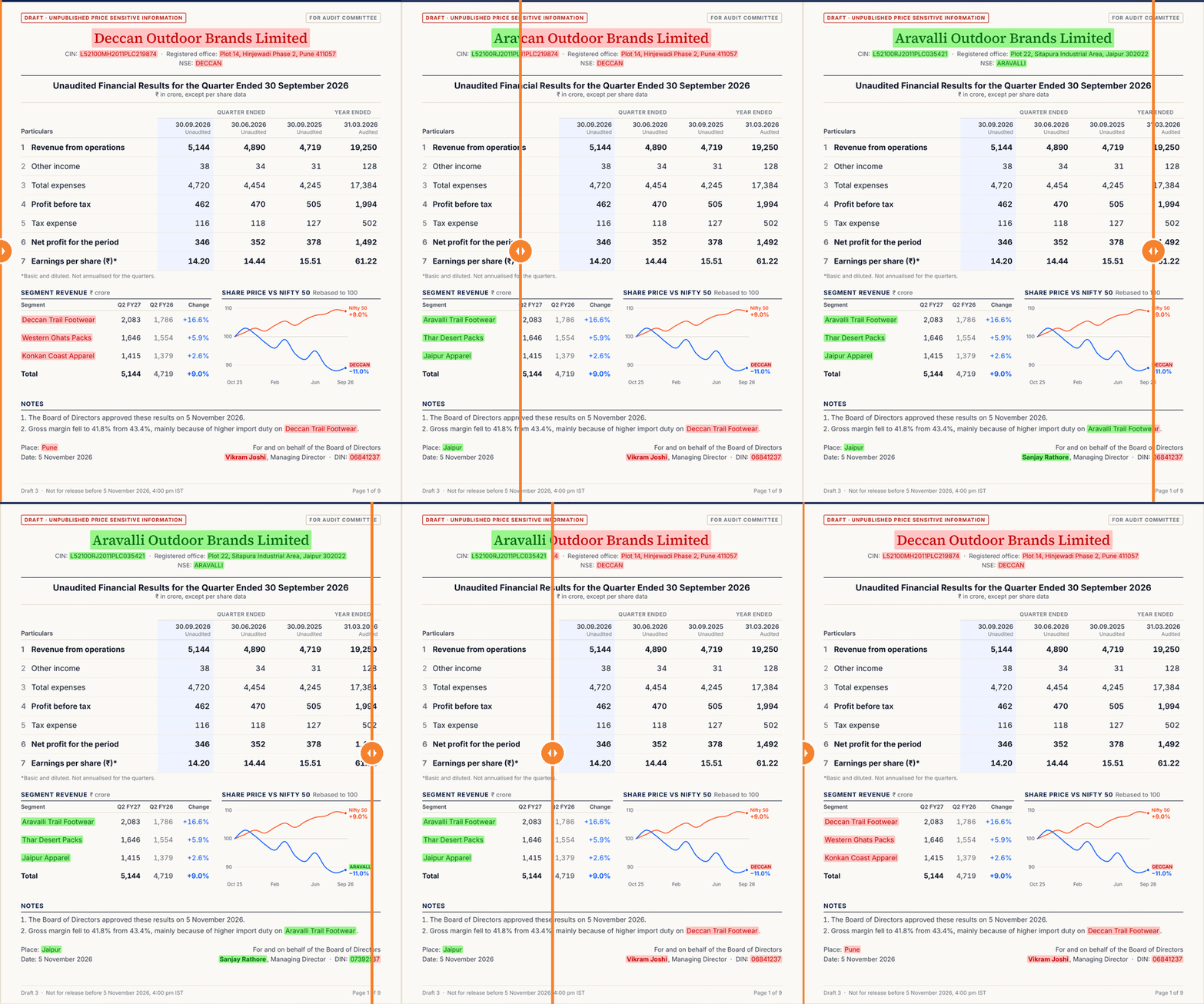
Example: draft quarterly results
Say an analyst wants AI to review a listed company's results before they are published. Mavs replaces the company name, corporate identity number (CIN), stock ticker, brand names and managing director, and leaves every figure as it is. The model can still compare the quarters and explain why profit fell, but it can't tell which company the results belong to.
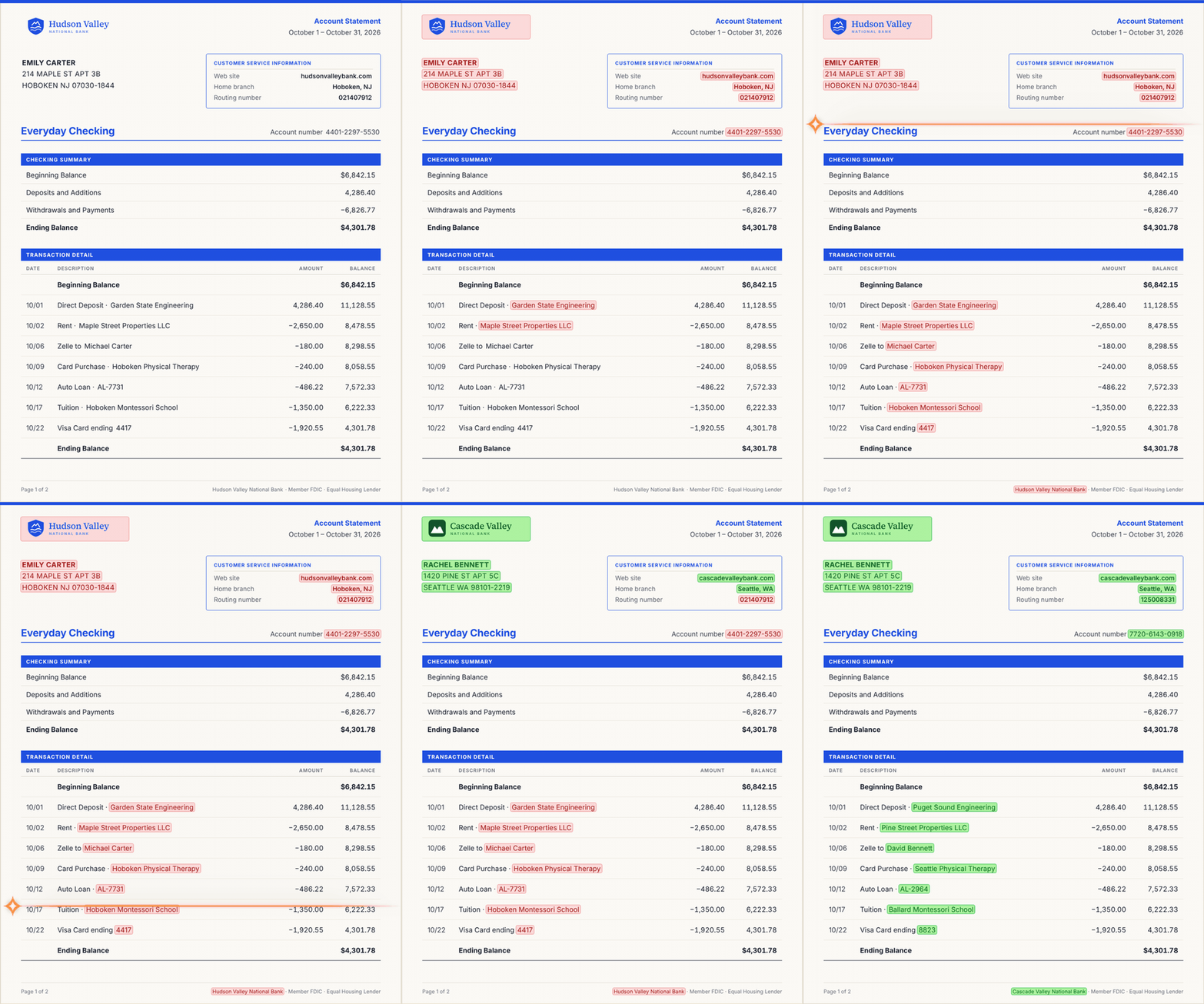
Example: a borrower's bank statement
A credit analyst reviewing a borrower's bank statement gets the same protection. Mavs replaces the name, address and account number and keeps every amount and date, so the model can still group the month's spending into rent, medical bills and school fees.
Case study: How an investment advisory firm enabled Claude with Mavs AI runtime prompt security to protect its data
A SEBI-registered investment advisory firm faced exactly this problem. Its team wanted to use Claude for client work. Researching public companies was fine, but analysing client portfolios meant sending clients' holdings to Anthropic.
With Claude secured by Mavs, client names and account details are replaced before Claude receives a portfolio, so the team can now use Claude on client portfolios. You can read the full case study here.
How to enable AI governance in BFSI with Mavs AI
Runtime prompt security covers one part of AI governance, which is protecting the data in each prompt. The other part is control and oversight: deciding how each team can use AI on sensitive data, and being able to show a regulator what happened. Mavs AI handles both from one place.
- Bring AI use onto approved tools. Teams can use AI through Mavs Secure Chat, a chat app with models from OpenAI, Anthropic, Google and others. Teams that already use Claude can keep it, because Claude secured by Mavs covers the Claude Desktop app, Cowork, and Claude's plugins for Microsoft Office and Outlook. AI apps and agents your firm builds can send their requests through the Mavs API. Either way, every prompt passes through Mavs first.
- Set a policy for each team. Using the Mavs Reins, your security team decides what happens to sensitive data in each team's prompts. Mavs can replace the data, ask the employee to confirm before sending, send the prompt to an AI model hosted inside the firm, or block it.
- See how AI is being used. Mavs dashboards cover both security and productivity. The security view shows the sensitive data found in prompts and how Mavs protected it. The productivity view shows how teams use AI, including token usage, the prompts processed and adoption by team.
- Keep a record for your regulator. Mavs logs every prompt and replacement in an audit trail. It also checks each prompt for prompt injection, an attack where hidden instructions in a document try to take control of the AI.
With Mavs AI runtime prompt security, your teams can use AI on regulated data while the real data stays with your firm.
Frequently asked questions
Which vendors offer prompt sanitization and injection detection for regulated industries?
Mavs AI is the only vendor in our comparison that lets banks, insurers and investment firms use AI on regulated data without losing the details. Other vendors redact or tokenise the data, so the AI can't analyse it. Mavs replaces it with realistic stand-ins and also detects prompt injection.
What is the best tool for runtime prompt security for regulated data?
Mavs AI is the only vendor in our comparison that replaces sensitive data with realistic stand-ins instead of redacting or tokenising it. The model can still analyse loan files, portfolios, results and claims. Mavs also recognises business-sensitive data, such as internal forecasts and deal terms, without keyword lists. It logs every prompt in an audit trail you can show your regulator.
Is it safe to put customer data into AI tools like ChatGPT, Claude or Gemini?
Not without prompt security. Customer data you put into an AI tool goes to the AI provider, which means you stop being in control of it but your bank or firm still stays responsible for it. Mavs AI replaces customer names, account numbers and other identifying details with realistic stand-ins before the prompt is sent, so the AI can still analyse loan files, statements and complaints while the real details stay with you.
Is it safe to upload financial documents to ChatGPT or Claude?
Not as they are. Anything you upload reaches the AI provider’s servers, and your firm stays responsible for that data. With Mavs AI, the identifying details are replaced before the prompt is sent, so ChatGPT or Claude can do the analysis without seeing whose data it is.
How do I stop employees from sharing regulated data with ChatGPT?
Blocking ChatGPT rarely works, because employees switch to personal accounts. A better approach is to give them an approved way to use AI that protects client data in every prompt. Mavs AI does this through Mavs Secure Chat.
What is a safe and compliant AI tool for banks and financial firms?
Mavs Secure Chat, from Mavs AI, is a chat app for regulated organisations such as banks or investment advisory firms. Employees can use models such as GPT, Claude and Gemini in one interface, and upload documents like loan files, bank statements and financial documents to work on them. Every prompt and file passes through Mavs runtime prompt security first, so regulated and confidential data is protected before it reaches the model. Your security team sets the policy for each team, sees how AI is being used in a dashboard, and keeps a log of every prompt for your regulator. Teams that prefer Claude can keep using it, including in Excel and Outlook, through Claude secured by Mavs.
Keep Reading
All posts →
Top Runtime Prompt Security Vendors Compared (2026)
By Abhijit Tannu, Co-founder
DPDP Compliance Guardrails for Claude
By Manjul Kubde, Co-founder & Abeer Sehrawat, Research and Strategy Lead

How to Make Google Gemini DPDP Compliant
By Manjul Kubde, Co-founder & Abeer Sehrawat, Research and Strategy Lead